New MkDocs plugins for embedding and visualizing audio
Posted on .
This post is part of a series:Making an integrated book/website about music coding using MkDocs, LaTeX, and Python
Since my book is about composition and sound design, it naturally contains a bunch of audio examples. 128 audio examples, to be exact. Embedding audio into the PDF version (via LaTeX) isn’t realistically viable: PDF readers vary, embedded media inflates file size, and long-term archival readability suffers. So I decided all audio examples would live on the web version, with links from the PDF pointing to the exact spot in the online text.
That meant I needed two things:
- A concise, author-friendly markdown syntax for declaring audio sources (including multiple fallback formats).
- A visual waveform so readers can quickly parse the shape, duration, and dynamics of a sound before (or while) listening.
While it is possible to use HTML elements in markdown, I ended up building two plugins for MkDocs to make life easier. Both plugins are published via PyPi and can be installed with pip:
mkdocs-audiotagturns a pseudo-image syntax into a proper<audio>element. Supports for multiple sources, attributes, and has sensible defaults.mkdocs-wavesurferenhances those audio elements with a client-side wavesurfer.js waveform. Supports customization and adoption of the site theme when used alongside mkdocs-material.
Why not just use raw HTML? Because the markdown authoring experience matters. Having to remember and duplicate <audio controls preload="metadata"> plus several nested <source> tags for every example is friction. A single, declarative, line-per-source syntax keeps manuscripts readable in raw form, diff-friendly, and consistent across contributors.
Simple markdown syntax for audio with mkdocs-audiotag
mkdocs-audiotag is intentionally simple. It reuses the image syntax pattern also seen in prior tools such as mkdocs-audio, but makes the MIME type explicit so the parser can reliably distinguish between audio container formats. It also supports multiple adjacent <source> elements to express fallback file formats and provides sane default settings.
Basic usage
To use the plugin, install with pip install mkdocs-audiotag and specify it in mkdocs.yml:
plugins:
  - mkdocs-audiotag
To specify an audio element, we use the syntax . By default, the <audio> element follows the recommended preloading setting, gets an enumerated id, and has a width of 100% and media controls enabled.
This concise markdown syntax generates the following HTML:
<audio preload="metadata" style="width:100%" controls="" id="audio-tag0">
  <source src="example.mp3" type="audio/mpeg">
</audio>
Which in the browser works like this:
Do note that native audio elements have very different styles across browsers.
Fallback sources
If we make two or more statements on consecutive lines, the files will be embedded as multiple <source> elements within an <audio> element. The first is the preferred format; the browser will try it first and gracefully fall back to the following source definition.

Produces the following HTML:
<audio preload="metadata" style="width:100%" controls="" id="audio-tag0">
  <source src="example.ogg" type="audio/ogg">
  <source src="example.mp3" type="audio/mpeg">
</audio>
Why MIME type instead of alt description?
Audio elements don’t have an alt attribute, so instead we use the field for explicit MIME types (audio/ogg, audio/mpeg, etc.). This helps the browser understand the file type and reduces ambiguity. The plugin only processes patterns where the MIME type specifier starts with audio/; otherwise it ignores the block.
Configuration
Most sites can enable mkdocs-audiotag with defaults. But if you do need to override the defaults, the following options are available:
plugins:
  - mkdocs-audiotag:
      preload: metadata   # none | metadata | auto
      loop: false
      controls: true
      autoplay: false
      muted: false
      width: 100%
Each option maps 1:1 to native <audio> element attributes, except for the width helper, which inlines the corresponding CSS. If you set controls: false you can still manipulate the element later with JavaScript or let mkdocs-wavesurfer handle the UI.
Beautiful waveforms with mkdocs-wavesurfer
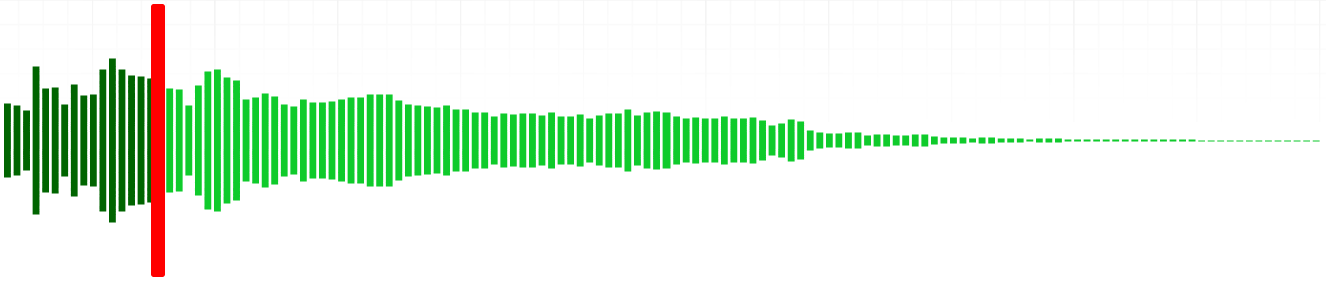
As details in sound synthesis are an important topic in my book, it was very useful for my readers to have a visual representation of the included audio examples. Enter wavesurfer.js, which does all the heavy lifting in my second plugin: Where mkdocs-audiotag declares audio, mkdocs-wavesurfer augments it. It scans the rendered HTML, finds the <audio> tags produced by mkdocs-audiotag, and for each one mounts a waveform via wavesurfer.js immediately beneath the controls.
Wavesurfer.js is a great library that provides visualization for audio files. It takes an existing <audio> element and creates a beautiful and fully stylable time-domain histogram (i.e. a waveform representation of the audio content). It has many additional features such as spectrogram generation, section markers, and a comprehensive event API.
Basic usage
To use the plugin, install it with pip install mkdocs-wavesurfer and specify it in mkdocs.yml (along with mkdocs-audiotag, which is a required dependency):
plugins:
  - mkdocs-audiotag   # required dependency
  - mkdocs-wavesurfer
Once enabled, the authoring syntax from mkdocs-audiotag automatically produces a waveform. No extra markup is required.
Customization
The following options for wavesurfer diagrams are exposed (note the snake case in mkdocs.yml):
plugins:
  - mkdocs-wavesurfer:
      height: 128
      wave_color: "#ff4e00"
      progress_color: "#dd5e98"
      cursor_color: "#ddd5e9"
      cursor_width: 2
      bar_width: 4
      bar_gap: 2
      normalize: true
      auto_scroll: true
It is only necessary to specify overrides; unspecified keys fall back to defaults.
Some options are auto-populated and intentionally ignored if you try to set them, because the plugin controls them for correctness: media_controls, media, url, container.
Theming
If you’re using mkdocs-material, the plugin can adapt to its color palette:
plugins:
  - mkdocs-wavesurfer:
      use_mkdocs_material_color: true
When enabled, explicit color overrides for wave_color / progress_color are ignored (with a logged warning) to prevent accidental mismatch.
Removing native controls
If you want only a waveform UI you can disable the native controls in the settings for mkdocs-audiotag:
plugins:
  - mkdocs-audiotag:
      controls: false
  - mkdocs-wavesurfer
Then provide your own playback UI (or let a custom JS layer handle it).
Linking from the PDF to the web
One of the most useful features of the integrated PDF/website is the easy access to audio examples from within the PDF. I’ve read quite a few books and other publications on audio and music technology, many of which have a number of associated audio examples available for listening on a website. But the integration between the book and the examples has always seemed somewhat laborious for the reader. The experience usually equates to searching through a CMS-like system to find the exact audio files which are mentioned in the text, going back and forth between website and book until the audio file is found.
My book and website are more tightly integrated: Any code block which has an associated audio example features an icon with a direct link to the specific location on the website where the audio example can be found. Audio examples are visualized and can be played directly in the browser.
I achieved this integration in the following way: The parsing script that builds the LaTeX source files for the PDF has a preprocessor which runs on all markdown content before handing the text off to md2tex for conversion. This preprocessor replaces the  syntax (introduced above) with an escaped text pattern that still includes the MIME type and file path. Without this escaping mechanism, md2tex would try to create images from the audio markup due to the syntactical similarity to markdown image definitions.
Then, after md2tex has done its thing, the parsing script also postprocesses the generated TeX files. During this postprocessing, the escaped placeholders are replaced with a LaTeX headphones icon and a link pointing directly to the relevant anchor in the web version.
Next steps?
For this blog, I developed an integrated audio player as a React component which ditches the native browser controls and displays a waveform with wavesurfer.js. Perhaps in the future, I will update mkdocs-wavesurfer to use a similar user interface. Do let me know if you wish to see this implemented.
Feedback
With mkdocs-audiotag and mkdocs-wavesurfer, audio is a first-class pedagogical material: Referenced in PDF, explored interactively online, and authored with minimal friction. If you try them out, feedback, issues, and pull requests are welcome via the two repos below.
Thanks to the developers and maintainers of MkDocs, mkdocs-material, and wavesurfer.js for the excellent tools that have made these plugins possible.
This post is part of a series: Making an integrated book/website about music coding using MkDocs, LaTeX, and Python
- Part 1: An integrated book and website
- Part 2: Converting markdown to LaTeX with md2tex
- Part 3: Making a pygments lexer to syntax highlight SuperCollider code
- Part 4: New MkDocs plugins for embedding and visualizing audio (this post)